For All Ages

Digital Literacy Courses

Essential digital skills for navigating the modern world. Our free courses cover everything from basic device usage to online safety, designed to be accessible and engaging for learners of all backgrounds.

Get Started - Apple Watch

30 minutes

Discover what Apple Watch can do in a 30-minute session. Take a tour of the hardware, learn to customize your watch face, and master the basic tools.

Get Started - iPad

60 minutes

Discover powerful ways to do more with your iPad in this 60-minute session. Take a tour of the latest features and learn how to navigate your device.

Get Started - iPhone

60 minutes

Navigate your iPhone with ease. Learn the latest features, explore apps, and discover tips to stay connected with what matters most.

Photography on iPhone

60 minutes

Turn your best moments into stunning photos on iPhone. Learn about the lenses, practice using different features, and explore ways to share your photos.

Recording Video on iPhone

30 minutes

Capture your best video with iPhone. Get familiar with basic tools in the Camera app and set up your first shot with a few simple taps.

Make Movies with iMovie

30 minutes

From recording videos to creating a visual story using iMovie for iPad. Capture video, get moving on with editing techniques, and learn how to edit audio.

For Grades 1-6

StoryBee Foundational Learning

StoryBee Open-Access Platform →

Progressive knowledge development through engaging stories and interactive learning. Our Knowledge Trees structure ensures every student builds comprehensive understanding from curiosity to mastery, preparing them for advanced programs like AP, IB, and university-level studies.

StoryBee Knowledge Trees: A Visual Learning Journey

Watch how learning builds from curiosity to mastery—one knowledge skill at a time

How Knowledge Trees Work

We organize books into Knowledge Trees, a structured framework that ensures progressive knowledge development. This approach mirrors how real academic mastery develops and prepares students for future success in advanced programs like AP, IB, and university level studies.

Each book hosts several different knowledge nodes, specific concepts, skills, or facts that connect to form comprehensive understanding. Rather than isolated learning, every book is linked to others, helping students build interconnected knowledge through structured progression.

Early Exposure

Introduce advanced concepts early in age appropriate, engaging ways that build foundation for future academic success.

Fun Learning

Engaging stories and interactive elements make complex topics accessible and enjoyable for young learners.

Steady Growth

Progressive structure ensures confidence and accomplishment at every level, never feeling overwhelmed or lost.

Explore Our Learning Pathways

Nine Subjects in total - Environmental Science, Chemistry, Biology, Human Geography, Modern History, Microeconomics, Macroeconomics, and more. Each pathway is thoughtfully designed to guide students from foundational knowledge to advanced understanding.

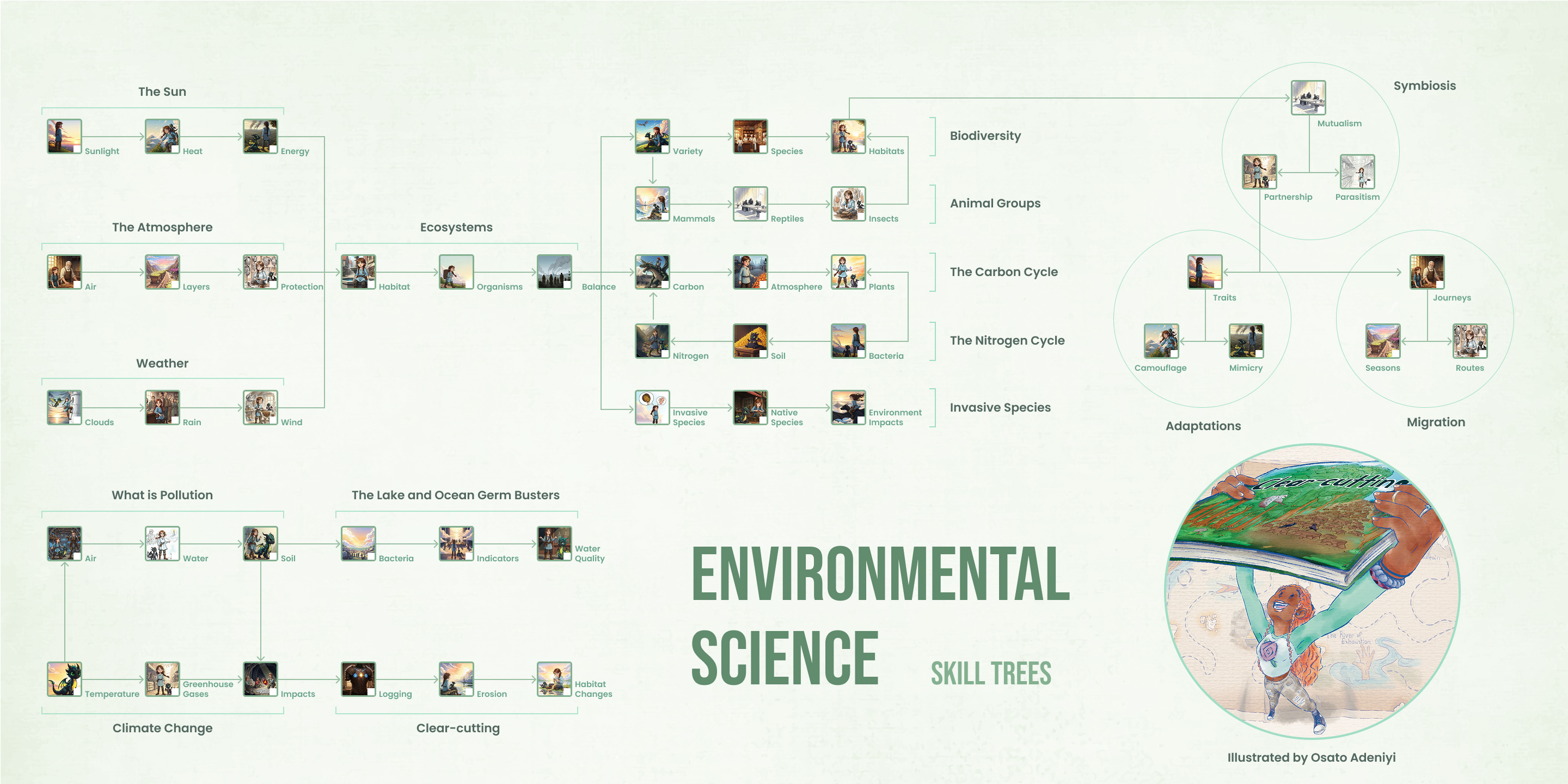
Environmental Science
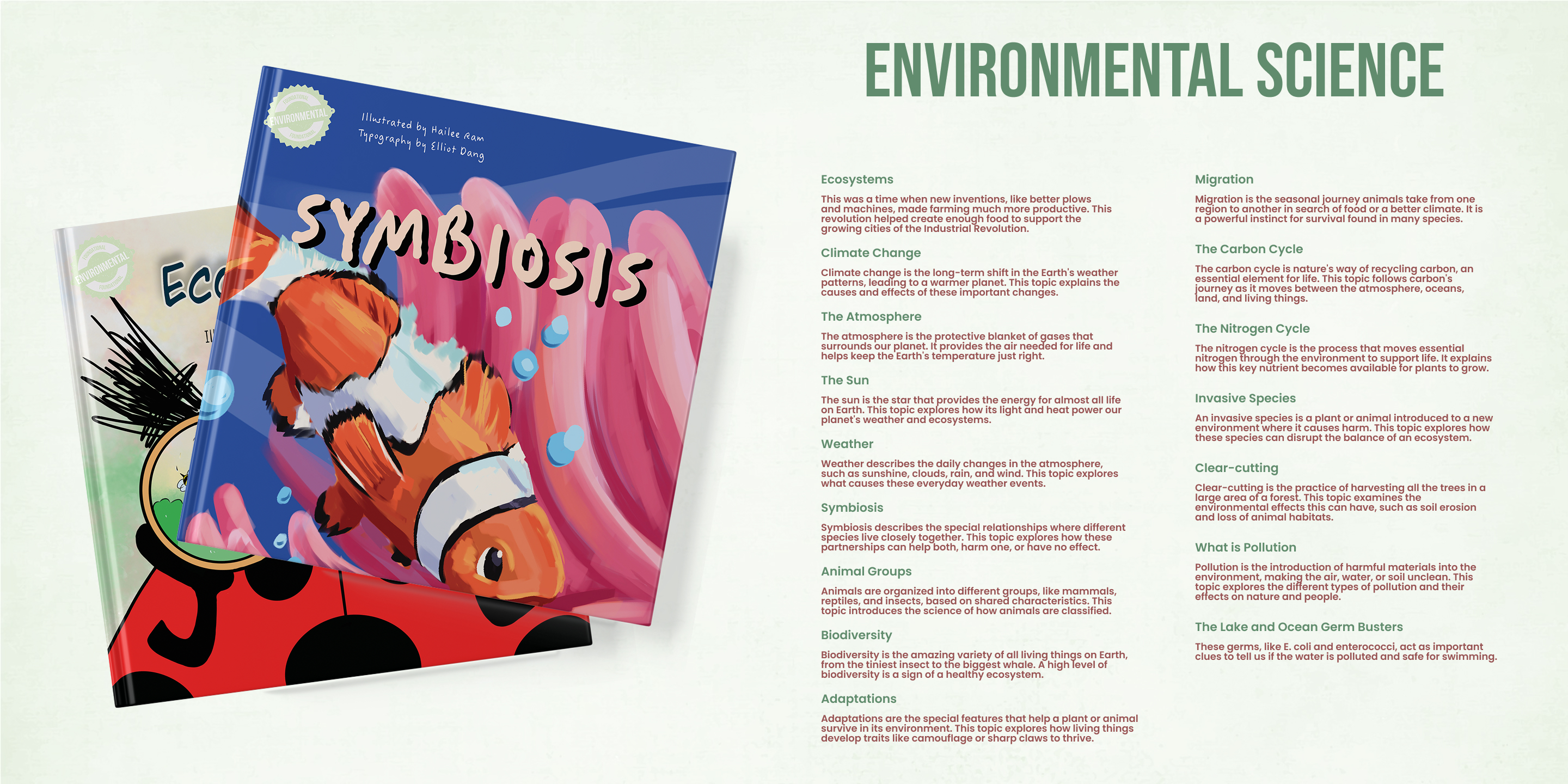
Environmental Science Introduction

Introduction

Environmental Science Checklist

Skills Checklist

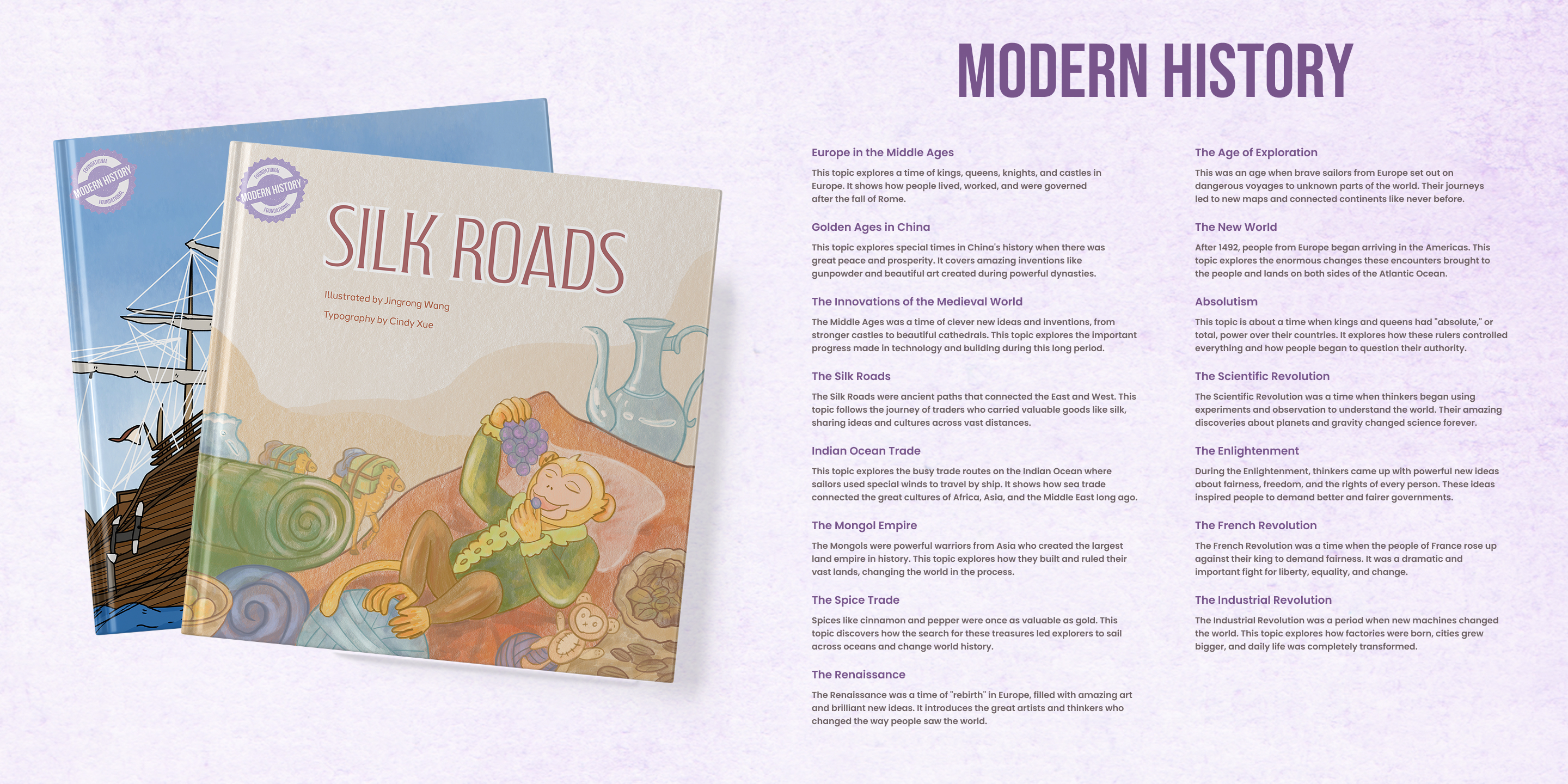
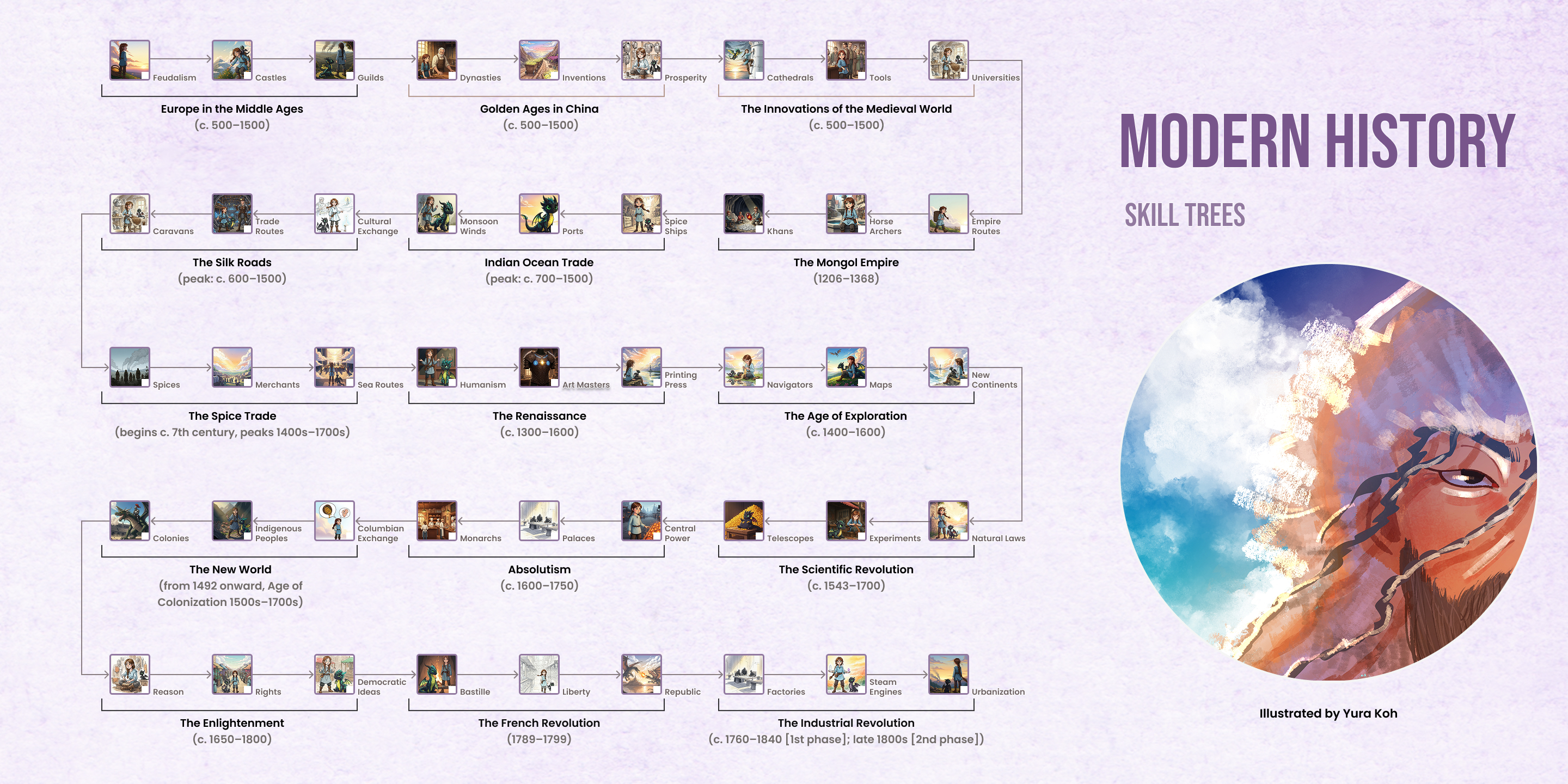
Modern History

Modern History Introduction

Introduction

Modern History Checklist

Skills Checklist

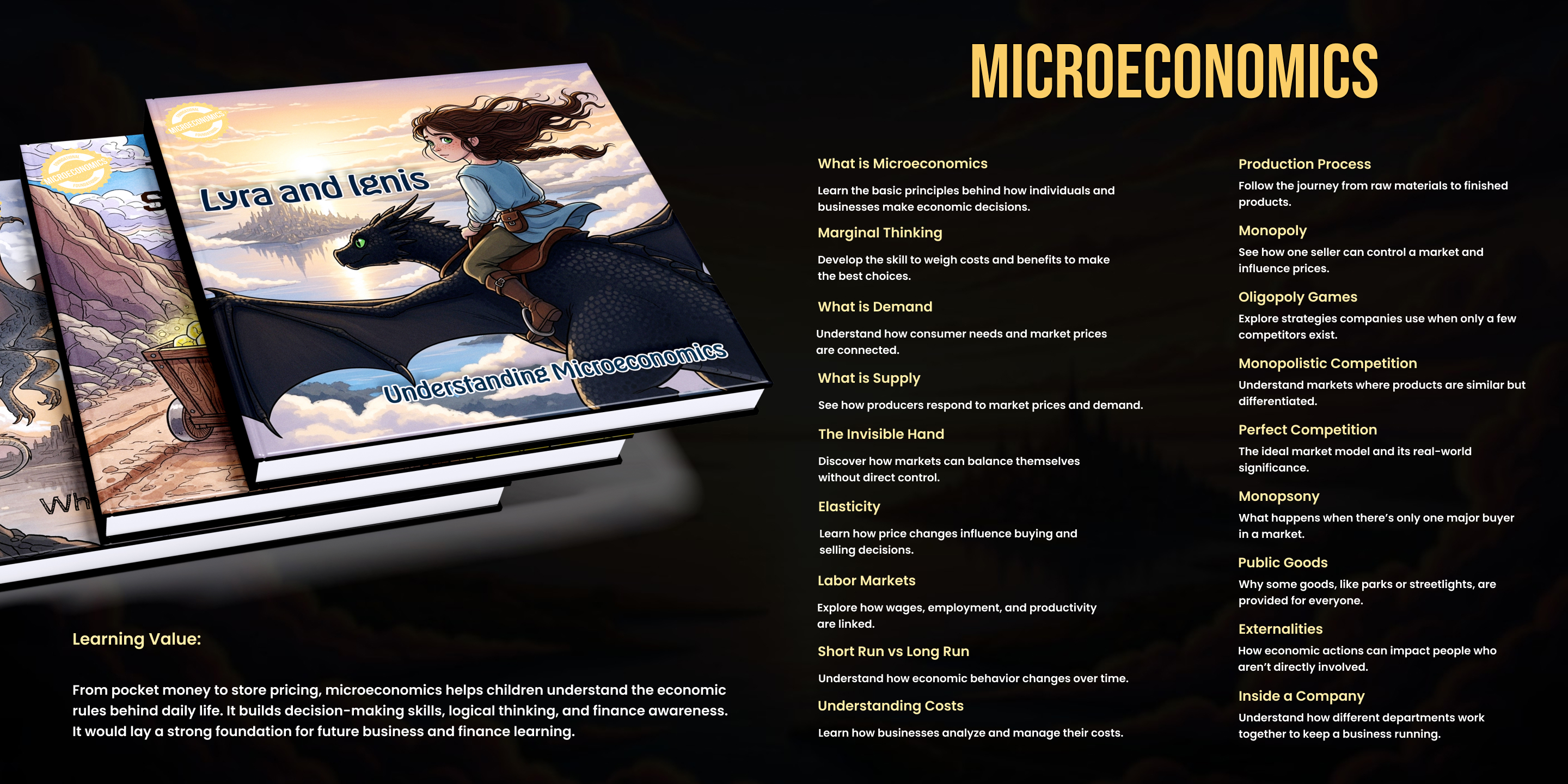
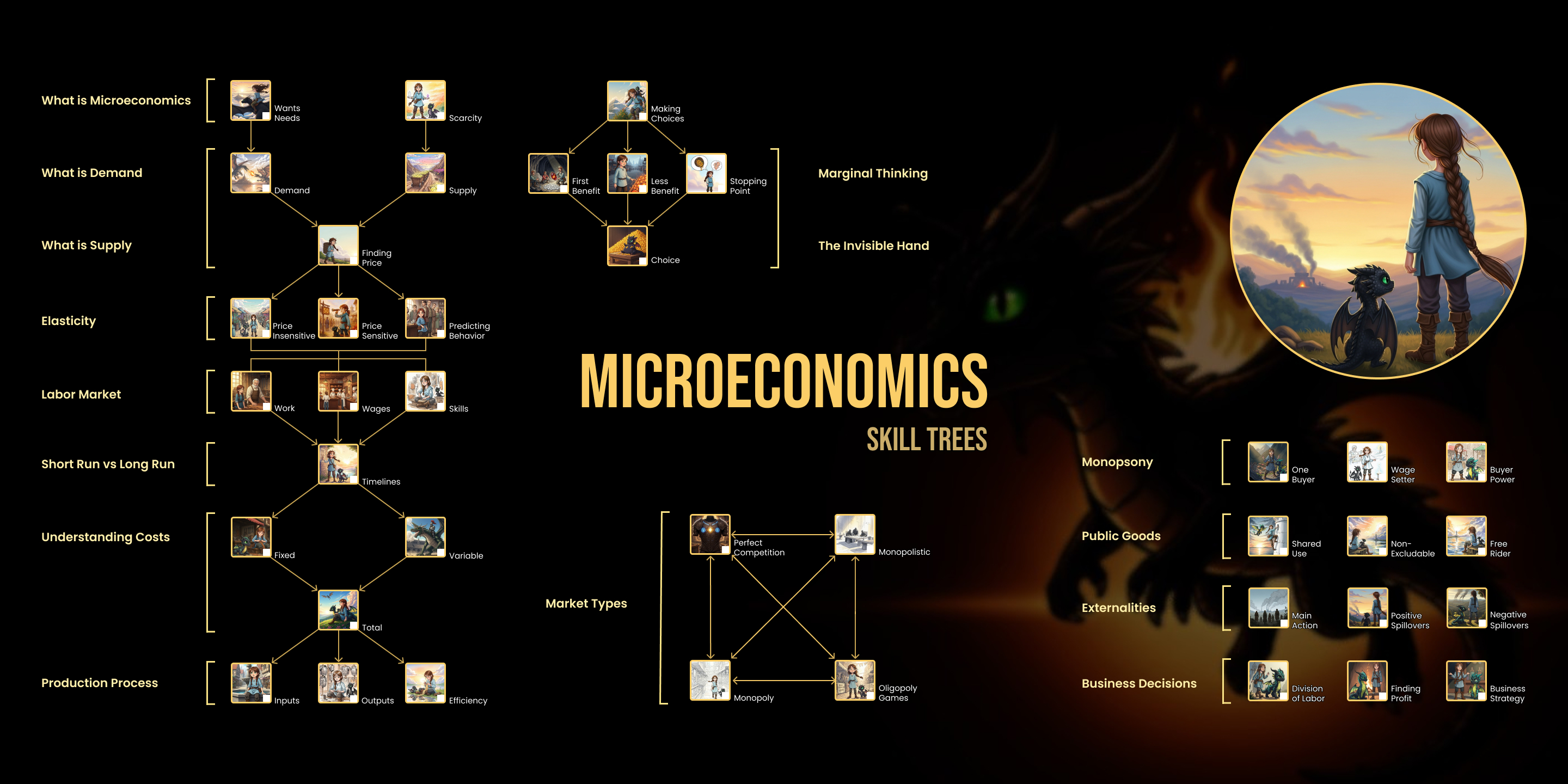
Microeconomics

Microeconomics Introduction

Introduction

Microeconomics Brochure

Skills Overview

G1-G3 Science

Grades 1-3

The wonders of nature, simple experiments, and everyday science through engaging stories.

Sign Up Soon

G3-G6 Science

Grades 3-6

Deepens scientific understanding with critical thinking challenges, and connections to real-world phenomena.

Sign Up Soon

G4-G6 Financial Literacy

Grades 4-6

Practical lessons on earning, saving, spending, and understanding the economy.

Sign Up Soon

Why Choose StoryBee Foundational Series?

Knowledge Trees

Structured progression ensures every concept builds on previous learning, creating strong foundations.

Interconnected Learning

Books are linked together, helping students see connections between different knowledge areas.

AP and IB Ready

Knowledge nodes align with advanced program requirements, giving students early advantage.

Engaging Stories

Complex concepts delivered through captivating narratives that make learning fun and memorable.

Confidence Building

Progressive challenges ensure steady growth without overwhelming students at any level.

Real World Connections

Learning linked to everyday experiences helps students understand practical applications.

For Teens & Adults

Advanced Tech Bootcamps

Professional-grade bootcamps designed to launch careers in technology. Learn industry-standard tools from experienced practitioners and build portfolio-worthy projects.

HTML Learning & Vibe Coding

20 Hours • $199 CAD

Learn to build interactive web pages and browser-based games through creative "vibe coding." Master HTML, CSS, and JavaScript fundamentals while creating playable prototypes you can share with the world. Perfect for beginners with no prior coding experience.

What You'll Learn

  • HTML page structure, CSS styling & layout fundamentals
  • JavaScript basics: variables, functions, events & interactivity
  • Interactive game development for browsers
  • Game design theory: mechanics, dynamics, aesthetics
  • VS Code setup and professional coding workflows
  • Digital asset integration (images, sounds) and user input
  • GitHub project publishing and digital portfolio creation
  • Creative tech careers and entrepreneurship opportunities

Learning Outcomes

  • Create interactive webpages and playable browser games
  • Apply basic game design theory to make engaging experiences
  • Integrate digital assets and capture user input effectively
  • Share projects online via GitHub with starter digital portfolio
  • Give and receive constructive feedback through peer critique

Session 1: Orientation & Digital Creativity

Session 1: Orientation & Digital Creativity

Program Overview, Introductions, and Community Building

The first session sets the foundation by welcoming participants, introducing the program's purpose, and building a sense of community. Students learn what to expect from the course, get to know one another through creative prompts, and collaborate on group agreements that foster an inclusive and supportive learning environment.

Learning Objectives
  • Introduce the overall goals, phases, and expectations of the bootcamp
  • Create a welcoming and inclusive atmosphere where all participants feel comfortable
  • Encourage students to begin thinking about themselves as creators and collaborators
  • Establish group values and shared agreements for respectful teamwork
Expanded Description

This opening session begins with a clear overview of the bootcamp's purpose: to explore vibe coding, game design, and Unity development while helping youth grow into confident digital creators. Facilitators outline the program structure — Phase 1 focuses on web-based creative coding, Phase 2 introduces Unity for professional game development, and Phase 3 concludes with a public showcase and portfolio preparation.

Introductions follow using prompts such as "What's your favorite game?" or "If you could design one, what would it be about?" These spark creativity and help participants connect in a fun, low-pressure way. Finally, the group co-creates community agreements — simple guidelines such as "encourage each other," "celebrate effort," and "respect all voices."

Introduction to Creative Tech Careers and Entrepreneurship

This part introduces students to the world of creative technology and entrepreneurial opportunities. Through real-life examples, participants learn how coding, game design, and digital creativity connect to careers such as app development, game design, digital art, and content creation.

Key Topics
  • Range of careers in creative technology (game developer, web designer, digital artist)
  • Entrepreneurship and self-directed projects
  • Building personal digital portfolios to showcase skills
  • Connecting personal interests to possible future pathways

Game Design Theory

Students explore the principles of game design and understand what makes a game fun, engaging, and meaningful. They learn about the building blocks of games — rules, goals, mechanics, and player experience through the MDA framework (Mechanics, Dynamics, Aesthetics).

Activities
  • Examine familiar games to understand what makes them engaging
  • Paper prototyping exercises to design simple games
  • Playtest each other's designs and practice constructive feedback
  • Connect design theory to coding projects

Setting up VS Code and Browser-Based Coding Environments

Students learn to install, configure, and navigate Visual Studio Code (VS Code) — one of the most widely used code editors — as well as explore browser-based environments (CodePen, Replit, Glitch) for accessible coding without heavy setup.

Technical Skills
  • Install and configure VS Code with essential extensions
  • Create and manage project files and folders
  • Use Live Server for previewing web projects
  • Navigate browser-based coding platforms
  • Begin building digital portfolios

Session 2: HTML, CSS & Interactive Game Elements

+

Basic HTML: Page Structure, Text, Images. Introduction to CSS for Styling and Layout

Students learn the foundations of web development: HTML for structure and CSS for design. They build the skeleton of a webpage using HTML and bring it to life with color, fonts, and layout through CSS.

HTML Fundamentals
  • HTML tags for structure: headings, paragraphs, links, images
  • Semantic HTML and accessibility best practices
  • Building a personalized introduction webpage
CSS Styling
  • How CSS controls visual presentation
  • Customizing fonts, colors, backgrounds, and layouts
  • Understanding the difference between content (HTML) and style (CSS)

Building an Interactive Web Page or Simple Game Interface

Students transition from static coding into interactive design. Using HTML, CSS, and JavaScript, they create webpages or simple game interfaces that respond to user actions such as clicks, key presses, or mouse movement.

Interactive Elements
  • Linking JavaScript with HTML and CSS
  • Creating clickable buttons and interactive elements
  • Implementing score counters or moving objects
  • Building basic game interfaces (click games, matching games, scoreboards)

Digital Asset Integration (Art, Sounds), User Input

Students learn to incorporate digital assets — images, sounds, and custom artwork — into their projects. They also capture user input, allowing games to respond to clicks, key presses, or other interactions.

Skills Covered
  • Importing and displaying images, graphics, and sounds
  • Writing code to play sounds and animate objects
  • Capturing user input (mouse clicks, keyboard events)
  • File management and asset organization

Team "Vibe Coding" Exercise and Real-Time Feedback

Students engage in a group "vibe coding" activity, coding together in teams to build small interactive projects. The focus is on experimentation, improvisation, and learning from each other with immediate feedback.

Collaborative Experience
  • Work in teams to build interactive demos or mini-games
  • Share roles: designer, coder, tester, presenter
  • Apply real-time feedback from peers and facilitators
  • Learn iterative design through testing and improvement

Session 3: JavaScript Fundamentals & Playable Prototypes

+

Introduction to JavaScript: Variables, Functions, Events

Students learn how variables store information, how functions organize and reuse code, and how events allow webpages and games to respond to user actions. These core concepts provide the foundation to create interactive experiences.

JavaScript Fundamentals
  • Variables as "containers" for storing data (scores, names, states)
  • Functions as reusable code blocks for tasks
  • Event listeners to detect clicks, key presses, and interactions
  • Building small interactive demos that respond dynamically

Adding Interactivity to Games (Controls, Scoring, Feedback)

Students make their projects behave like real games by adding player controls, tracking scores, and providing feedback. These elements transform simple webpages into dynamic and engaging games.

Game Mechanics
  • Implementing player controls (arrow keys, spacebar, mouse clicks)
  • Creating scoring systems that update in real time
  • Providing visual feedback (color changes, animations)
  • Adding audio feedback (success sounds, error cues)
  • Designing interactive game loops where input leads to changes

Bringing It Together: Each Participant Completes a Playable Browser Game

The culmination of Phase 1 where students integrate everything they've learned into a complete project. Each participant builds a small, fully functional browser game demonstrating their creativity, problem-solving, and coding skills.

Final Project
  • Combine HTML, CSS, and JavaScript into one coherent project
  • Apply game design principles (rules, goals, scoring, feedback)
  • Personalize games with unique themes, assets, and mechanics
  • Learn basic debugging and problem-solving
  • Share finished, playable projects with peers for testing

Project Sharing on GitHub, Digital Portfolios, and Peer Critique

Students learn to use GitHub to publish and store their projects, build a simple digital portfolio to showcase their creations, and participate in peer critiques to develop constructive feedback skills.

Professional Skills
  • Upload and share completed games on GitHub
  • Introduction to version control basics
  • Create and organize digital portfolios
  • Participate in structured peer critique sessions
  • Reflect on work and identify strengths and areas for improvement
1. What is this course about?
This 20-hour bootcamp introduces students to creative coding and interactive game design using HTML, CSS, and JavaScript. It is designed as the perfect entry point into coding for beginners, focusing on building simple, playable browser games while learning the foundations of digital creativity.
2. How much does it cost?
The course fee is $199 CAD for the full 20-hour program.
3. What will students learn?
Session 1: Orientation & Digital Creativity Kickoff
  • Program overview, introductions, and community building
  • Introduction to creative tech careers and entrepreneurship
  • Game Design Theory (mechanics, dynamics, aesthetics)
  • Setting up VS Code and browser-based coding environments
Session 2: HTML, CSS & Interactive Game Elements
  • Basic HTML structure (text, images, links) and CSS for styling and layout
  • Building interactive webpages or simple game interfaces
  • Integrating digital assets (art, sounds) with user input
  • Team "vibe coding" collaborative exercise with real-time feedback
Session 3: JavaScript Fundamentals & Playable Prototypes
  • JavaScript basics: variables, functions, and events
  • Adding interactivity to games (controls, scoring, feedback loops)
  • Completing a simple playable browser game project
  • Sharing projects on GitHub, creating digital portfolios, and peer critique
4. What are the learning outcomes?
By the end of the course, students will be able to:
  • Understand the foundations of coding with HTML, CSS, and JavaScript
  • Create interactive webpages and playable browser games
  • Apply basic game design theory to make games engaging and fun
  • Integrate digital assets (images, sounds) and capture user input
  • Share projects online via GitHub and build a starter digital portfolio
  • Give and receive constructive feedback through peer critique
5. Who is this course for?
This course is ideal for youth and beginners with little or no prior coding experience. It's a great starting point for those interested in creative technology, game design, or digital storytelling.
6. What support is included?
  • Access to coding environments (VS Code setup guidance and browser-based tools)
  • Hands-on mentorship from facilitators
  • Peer collaboration and teamwork exercises
  • Extra help through office hours and shared digital resources
7. What do students need to bring?
  • A laptop capable of running VS Code or a browser-based coding platform
  • An open mind, creativity, and willingness to collaborate with peers
8. What happens after the course?
Students can:
  • Continue developing their skills by building more games and interactive projects
  • Expand their digital portfolios for school or career opportunities
  • Progress to the Unity Game Development Course, where they'll advance into 2D/3D game creation with professional industry tools

NRIDL X Unity Game Development Bootcamp

40 Hours • $899 CAD

Transition from browser-based coding to professional game development with Unity. Learn C# scripting, 2D/3D game mechanics, physics, and build a complete portfolio-worthy game from concept to deployment. Master one of the most widely used platforms in the gaming industry.

Why Learn Unity?

  • Accessibility: User-friendly interface with vast online resources, tutorials, and community forums - perfect for beginners
  • Versatility: Create 2D and 3D games for mobile, desktop, consoles, VR/AR, and web platforms
  • Industry Relevance: Widely used in the gaming industry, especially among indie studios and mobile game development
  • Career Opportunities: Proficiency in Unity opens doors to game development jobs and related creative tech fields
  • Solid Foundation: Learn transferable game development concepts including coding, engine functionality, and design best practices

What You'll Learn

  • Unity Hub & Editor setup, navigation, and project management
  • C# scripting fundamentals for game behaviors and interactions
  • Building interactive game scenes with objects, physics, and collisions
  • Player controls, movement systems, and game state management
  • UI design, sound integration, and visual polish techniques
  • Debugging strategies and troubleshooting common Unity issues
  • Playtesting, iteration, and game balancing
  • Exporting projects for WebGL and desktop platforms
  • Digital portfolio creation and professional documentation
  • Monetization basics and game publishing fundamentals
  • Team collaboration and version control basics

Learning Outcomes

  • Install, configure, and navigate Unity to create 2D/3D projects
  • Write and apply C# scripts for movement, interactivity, and game states
  • Build complete game scenes with physics, collisions, and player controls
  • Debug, polish, and test games for improved player experience
  • Export shareable projects for web and desktop platforms
  • Create professional digital portfolios showcasing your work
  • Understand monetization pathways and entrepreneurship in gaming
  • Present finished games confidently in public showcases

Course Structure

  • Duration: 40 hours across 5 weeks
  • Phase 1 (4 weeks): Unity Studio Foundations - hands-on learning and project development
  • Phase 2 (1 week): Demo Day showcase with industry feedback and celebration
  • Class Size: Small groups for personalized mentorship and support

Session 1: Setting Up Unity Hub & Exploring the Editor

Installation & Configuration

This session marks the beginning of Phase 2, where students transition from browser-based vibe coding into professional game development with Unity. They learn to install and configure Unity Hub, explore the Unity interface, write their first lines of C# code, and practice importing and managing digital assets.

Learning Objectives
  • Guide students through installation and setup of Unity Hub and Unity Editor
  • Introduce the Unity interface: scenes, hierarchy, game objects, and assets
  • Teach basics of C# scripting for simple actions and behaviors
  • Demonstrate how to import, organize, and manage assets for Unity projects
Unity Hub Setup
  • Download and install Unity Hub - the gateway to Unity projects
  • Install correct Unity Editor version with 2D, 3D, and WebGL modules
  • Create first Unity project with organized folder structure
  • Establish clean project management habits from day one

Navigating the Unity Interface

Students are introduced to Unity's workspace and learn the purpose of each major panel. Understanding the interface is crucial for efficient game development.

Core Interface Components
  • Scene View: Where objects are placed and the game world is built
  • Hierarchy: Lists all game objects currently in a scene
  • Inspector: Adjust properties of selected objects
  • Project/Assets Folder: Stores and organizes all game resources
  • Practice navigating between panels and manipulating simple shapes

First C# Script

Introduction to C# as Unity's programming language. Students write their first script to control game object behavior, just as JavaScript controlled interactivity in Phase 1.

Coding Fundamentals
  • Understanding C# as the language that controls Unity behaviors
  • Writing first script - moving an object with key presses
  • Attaching scripts to game objects in the scene
  • Demystifying scripting through practical, small examples
  • Seeing how code brings projects to life

Asset Management

Students practice importing and organizing assets including images, audio, and 3D models. Clean asset management keeps projects efficient and professional.

Organization Best Practices
  • Importing images, audio files, and 3D models into Unity
  • Creating organized folder structure (Sprites, Sounds, Models, Scripts)
  • Understanding asset types and their uses in Unity projects
  • Establishing professional project organization habits
Session Outcomes
  • Functional Unity workspace ready for development
  • Understanding of Unity interface and navigation
  • First working C# script attached to game object
  • Clean, organized project with imported assets
  • Confidence to move forward into complex mechanics

Session 2: Game Mechanics & Scripting in Unity

+

Building Interactive Scenes

This session focuses on bringing Unity projects to life by designing game mechanics and using C# scripting to control them. Students build scenes by adding objects, applying physics, and making them interactive through code.

Scene Construction
  • Creating functional Unity scenes with 2D/3D objects
  • Adding platforms, characters, obstacles, and environmental elements
  • Applying physics properties: gravity, collisions, rigid bodies
  • Observing how objects interact realistically
  • Understanding foundations of game mechanics and rules

Advanced C# Scripting

Students take a deeper dive into C# to program player movement, user controls, and game states. They learn how code structures the player's experience from start to finish.

Core Programming Concepts
  • Character movement: left/right with arrow keys, jumping with spacebar
  • User input detection and response systems
  • Game states: start screens, play mode, game over
  • Resetting gameplay when hitting obstacles or losing
  • Structuring code for clear gameplay flow

Collision & Scoring Systems

Understanding how to implement core game mechanics like collision detection, scoring systems, and win/loss conditions that drive engaging gameplay.

Gameplay Mechanics
  • Detecting collisions between game objects
  • Implementing scoring and point systems
  • Creating win and loss conditions
  • Triggering events based on player actions
  • Balancing difficulty and challenge

Team Collaboration & Version Control

Students work in small teams to extend their projects, learning collaborative development practices that mirror professional game studios.

Collaborative Skills
  • Working in teams with assigned roles: coder, designer, tester
  • Introduction to version control basics and why developers use it
  • Learning to track changes and collaborate without conflicts
  • Saving, committing, and sharing project files effectively
  • Understanding real-world professional workflows
Session Outcomes
  • Functional Unity game with interactive mechanics
  • Working physics system with realistic object interactions
  • Scripts controlling movement, inputs, and game states
  • Experience with team development and collaboration
  • Understanding of version control principles

Session 3: Polishing & Playtesting

+

Game Polish & User Interface

This session emphasizes refinement, testing, and iteration - essential skills for turning a working prototype into a polished, engaging game. Students enhance their projects with professional UI elements, sound, and visual effects.

UI Enhancement
  • Creating start menus, pause screens, and game over displays
  • Adding score counters, health bars, and progress indicators
  • Designing buttons and interactive UI elements
  • Understanding UI/UX principles for games
  • Making games accessible and easy to understand

Sound & Visual Effects

Integration of audio and visual elements that enhance player experience and make games feel professional and complete.

Audio Integration
  • Adding sound effects for jumps, collisions, and interactions
  • Implementing background music and ambient sounds
  • Understanding audio timing and triggers
Visual Polish
  • Adjusting lighting for mood and atmosphere
  • Applying textures and materials to objects
  • Adding particle effects for impacts and special events
  • Creating visual feedback for player actions

Debugging & Troubleshooting

Developing problem-solving skills through systematic debugging. Students learn to view troubleshooting as an essential creative process rather than frustration.

Debugging Strategies
  • Using Unity Console window to track errors
  • Reading and understanding debugging logs
  • Fixing common issues: broken scripts, misplaced assets, physics bugs
  • Systematic approach to identifying problems
  • Testing and validating fixes

Peer Playtesting & Iteration

Students share their games with classmates and mentors, learning the principle of iteration: games become better through cycles of feedback and refinement.

Testing Process
  • Facilitating peer playtesting sessions
  • Giving and receiving constructive feedback
  • Focusing on gameplay, mechanics, and enjoyment
  • Professional mentor insights and guidance
Iterative Improvement
  • Understanding iteration as ongoing creative process
  • Making quick improvements based on testing
  • Balancing difficulty and adjusting controls
  • Enhancing clarity and player understanding
  • Refining mechanics for better experience
Session Outcomes
  • Polished games with professional UI elements
  • Integrated sound effects and visual polish
  • Experience with systematic debugging
  • Understanding of iterative design process
  • Games ready for public showcase

Session 4: Portfolio Prep & Monetization Basics

+

Exporting & Publishing

This session equips students with skills to share their Unity creations beyond the classroom. They learn to export projects for different platforms and publish them for the world to experience.

Platform Deployment
  • Building projects for WebGL (browser-based play)
  • Creating desktop applications for Windows/Mac
  • Testing builds on different devices
  • Understanding platform-specific requirements
  • Optimizing for performance and file size
  • Sharing games with friends, family, and wider audiences

Digital Portfolio Development

Students learn that portfolios are curated stories of growth and creativity, not just collections of files. They document their work professionally for future opportunities.

Portfolio Components
  • Taking compelling screenshots and recording gameplay clips
  • Writing descriptions explaining design choices and coding contributions
  • Reflecting on learning journey: challenges faced and solutions found
  • Organizing work for presentation to teachers, employers, or collaborators
  • Creating case studies that showcase problem-solving abilities

Monetization & Entrepreneurship

Introduction to how games generate income and platforms where indie creators can publish and potentially earn from their work.

Revenue Models
  • Paid downloads and pricing strategies
  • Advertising integration and ad networks
  • In-app purchases and microtransactions
  • Free-to-play vs. premium game models
Publishing Platforms
  • itch.io: Indie-friendly platform for experimental games
  • Steam: Major PC gaming marketplace
  • Mobile App Stores: iOS and Android distribution
  • Understanding submission requirements and processes
  • Real-world stories of successful indie developers

Creative Entrepreneurship

Framing opportunities within the broader idea of creative entrepreneurship. Students see themselves as innovators capable of building projects with real-world impact.

Career Pathways
  • Independent game development and self-publishing
  • Freelancing opportunities in game development
  • Joining game studios as junior developers
  • Building indie teams and collaborating remotely
  • Understanding the game development industry landscape
Session Outcomes
  • Exportable game builds ready to share
  • Professional digital portfolio with documentation
  • Understanding of monetization and publishing options
  • Awareness of entrepreneurial pathways in gaming
  • Confidence in technical and business fundamentals

Session 5: Demo Day & Creative Futures

+

Public Showcase

The final session is a celebration of achievement and launchpad for future opportunities. Students present their browser-based and Unity games in a professional showcase attended by peers, families, and industry guests.

Presentation Experience
  • Demonstrating browser games from Phase 1 and Unity projects from Phase 2
  • Explaining design choices, challenges, and successes
  • Building confidence in public speaking and presentation
  • Receiving applause and recognition from audience
  • Affirming the value and quality of student work

Professional Portfolio Review

Invited creative tech professionals provide personalized portfolio feedback, offering students insight into real-world industry standards while validating their progress.

Mentorship & Feedback
  • Sharing digital portfolios with industry professionals
  • Receiving constructive feedback on gameplay clips and documentation
  • Professional insights on strengths and improvement areas
  • Understanding industry expectations and standards
  • Guidance on continuing portfolio development

Next Steps & Pathways

Facilitated discussion on future opportunities, helping students understand that the bootcamp is a springboard into continued growth in creative technology.

Educational Pathways
  • High school courses in computer science and digital arts
  • Post-secondary programs in game design and development
  • Online learning resources and continued skill building
Professional Opportunities
  • Internship opportunities with local studios
  • Volunteer positions in creative tech organizations
  • Self-publishing on platforms like itch.io and mobile stores
  • Participating in game jams and community events
  • Ongoing NRIDL mentorship and networking

Graduation & Celebration

Formal recognition of student achievements with certificates, celebration, and connection to ongoing support through NRIDL's creative community.

Community Connection
  • Certificate of completion for each student
  • Recognition ceremony with family, peers, and mentors
  • Emphasis on belonging to larger creative ecosystem
  • Access to ongoing NRIDL supports and resources
  • Connection to mentorship networks and opportunities
Session Outcomes
  • Public presentation of completed projects
  • Professional portfolio feedback incorporated
  • Clear understanding of next steps and pathways
  • Sense of community and ongoing support
  • Celebration of achievements and growth
  • Confidence to continue creative technology journey
1. What is this course about?
This Unity course is designed to introduce youth to professional game development using Unity, one of the most widely used platforms in the gaming industry. Over 40 hours of hands-on learning, students will explore how to design, script, polish, and publish their own games, while building a digital portfolio to showcase their work.
2. Why should I learn Unity?
Accessibility and Ease of Learning:
  • User-friendly interface with vast online resources, tutorials, and community forums
  • Start with visual scripting or learn C# for advanced functionality
  • Gentle learning curve perfect for beginners
Versatility in Development:
  • Create both 2D and 3D games and interactive experiences
  • Develop for mobile, desktop, consoles, VR/AR, and web platforms
  • One skillset applicable across multiple platforms
Industry Relevance and Job Opportunities:
  • Widely used in game development industry, especially indie and mobile games
  • Proficiency opens doors to various creative tech careers
  • Strong demand for Unity developers in job market
Solid Foundation in Game Development:
  • Learn fundamental concepts: coding, engine functionality, design best practices
  • Skills transfer to other engines and platforms if needed
  • Understanding of complete game development workflow
3. How long is the course?
The Unity program runs for 40 hours, spread across:
  • Phase 1: 4 weeks of structured instruction (Unity Studio Foundations)
  • Phase 2: 1 showcase week (Demo Day & Creative Futures)
Each week includes structured lessons, hands-on project work, and peer collaboration time.
4. What will students learn?
Phase 1: Unity Studio Foundations
  • Session 1: Installing Unity Hub, navigating interface, C# scripting basics, importing assets
  • Session 2: Building game scenes, physics and interactivity, player controls, team collaboration, version control
  • Session 3: Polishing with UI, sound, and visual design; debugging; playtesting with peers and mentors
  • Session 4: Exporting for desktop and web, building digital portfolios, monetization and entrepreneurship basics
Phase 2: Showcase & Industry Engagement
  • Session 5: Demo Day - present projects to peers, families, and industry guests; professional portfolio feedback; explore future pathways (internships, education, self-publishing); celebrate with certificates of completion
5. What are the learning outcomes?
By the end of the course, students will be able to:
  • Install and configure Unity to create 2D/3D projects
  • Build interactive game scenes with objects, physics, and controls
  • Write and apply C# scripts for movement, game states, and interactivity
  • Debug, polish, and test games for improved player experience
  • Export projects for WebGL and desktop, making them shareable
  • Document work in a professional digital portfolio
  • Understand pathways for monetization and entrepreneurship in gaming
  • Present finished games confidently in public showcases
6. Who is this course for?
This course is ideal for youth with basic coding exposure or strong interest in game development who want to learn Unity in a structured, supportive environment. Beginners are welcome - no prior Unity experience is required. Perfect for students who have completed the HTML Learning & Vibe Coding bootcamp or have equivalent foundational coding knowledge.
7. What support is included?
  • Access to Unity-ready workstations (if needed)
  • Loaner equipment available where needed
  • Office hours for extra help and questions
  • Guidance from experienced mentors throughout the program
  • Feedback from creative tech professionals during Demo Day
  • Transit support and snacks during in-person sessions
  • Ongoing connection to NRIDL community and resources
8. What do students need to bring?
  • A laptop capable of running Unity (if available; workstations provided if needed)
  • Enthusiasm, creativity, and readiness to collaborate with peers
  • Open mindset for learning and experimentation
9. What happens after the course?
Graduates are encouraged to continue building their portfolios and may explore pathways such as:
  • Applying for internships or volunteer opportunities in creative tech
  • Pursuing further education in coding, game design, or digital arts
  • Publishing their own games on platforms like itch.io or mobile app stores
  • Participating in game jams and community development events
  • Staying connected with NRIDL for ongoing mentorship and opportunities
  • Advancing to specialized Unity learning (AR, VR, or artistic development)

NRIDL X Figma UI/UX Design Bootcamp

40 Hours ($199) or 80 Hours ($399)

Master Figma and launch your design career with two comprehensive tracks. Choose Figma Foundations (40 hours, $199) to master the tools from zero to your first app, or UI/UX Career-Starter (80 hours, $399) for the complete end-to-end design process with a portfolio-worthy capstone project.

Two Tracks Available

  • Figma Foundations (40 Hours - $199): From zero to first app. Master fundamental tools and features through hands-on exercises, progressing from basic shapes to designing and prototyping a multi-screen mobile application.
  • UI/UX Career-Starter (80 Hours - $399): Complete end-to-end design process. Learn user research, problem definition, wireframing, UI principles, prototyping, and usability testing while building a portfolio-worthy capstone project.

What You'll Learn

  • Figma interface navigation and essential design tools
  • User-centered design methodologies and research fundamentals
  • Wireframing, prototyping, and user testing techniques
  • UI principles: typography, color theory, layout, and spacing
  • Design systems development and component libraries
  • Mobile and responsive design best practices
  • Interaction design and micro-animations
  • Agile and Design Thinking methodologies

Learning Outcomes

  • Proficiency in Figma's interface and core features
  • Ability to translate ideas into static designs and interactive prototypes
  • Understanding of complete UI/UX design workflow from research to testing
  • Portfolio-ready project demonstrating problem-solving abilities
  • Process-driven mindset of a professional product designer
  • Confidence to bring your own digital ideas to life

Teaching Philosophy

  • Practical, industry-focused approach combining theory with real-world applications
  • Hands-on learning with ample time for practice and instructor feedback
  • Portfolio development ensuring graduates have both knowledge and practical skills
  • Small class sizes (12-16 students) for personalized attention

Course Tracks

Both tracks follow a progressive learning path, with the Career-Starter track offering deeper dives into each topic and additional modules on user research, design thinking, and professional workflows.

Track 1: Figma Foundations - From Zero to First App (40 Hours - $199)

Week 1-2: Getting Started & Core Tools

Introduction to Figma's interface, workspace navigation, and fundamental design tools. Students learn to create and manipulate basic shapes, work with layers, and understand the frame-based structure that makes Figma unique.

Key Topics
  • Figma interface overview and workspace navigation
  • Creating and manipulating shapes (rectangles, circles, polygons)
  • Understanding frames, groups, and layers
  • Basic transformations: moving, resizing, rotating
  • Introduction to constraints and responsive design
  • Working with colors, gradients, and effects

Week 3-4: Typography, Assets & Components

Deep dive into typography principles, working with images and icons, and creating reusable components. Students learn how to build a basic design system with consistent styles and components.

Skills Covered
  • Typography fundamentals: font pairing, hierarchy, readability
  • Working with images, icons, and vector graphics
  • Creating and using components (buttons, cards, inputs)
  • Text and color styles for consistency
  • Auto Layout basics for responsive components
  • Organizing files and pages efficiently

Week 5-6: Designing Your First Mobile App

Students apply everything learned to design a multi-screen mobile application. Focus on layout principles, information hierarchy, and creating cohesive user interfaces across multiple screens.

Project Work
  • Planning app structure and screen flow
  • Designing individual screens (home, details, profile, settings)
  • Applying layout principles and visual hierarchy
  • Creating consistent navigation patterns
  • Using grids and spacing systems
  • Mobile design best practices (touch targets, gestures)

Week 7-8: Prototyping & Final Polish

Introduction to interactive prototyping, creating click-through demos, and adding micro-interactions. Students complete their capstone project with polished designs and working prototypes ready for portfolio presentation.

Final Deliverables
  • Creating interactive prototypes with connections and overlays
  • Adding transitions and basic animations
  • Testing prototypes and gathering feedback
  • Preparing presentation-ready design files
  • Exporting assets and sharing prototypes
  • Portfolio documentation and case study basics

Track 2: UI/UX Career-Starter (80 Hours - $399)

+

Phase 1: Foundation & Design Thinking (Weeks 1-3)

Introduction to user-centered design, design thinking methodology, and Figma fundamentals. Students learn to approach design problems systematically, starting with user research and problem definition before jumping into visual design.

Core Concepts
  • Introduction to UX design principles and methodologies
  • Design Thinking framework (Empathize, Define, Ideate, Prototype, Test)
  • User research fundamentals: interviews, surveys, personas
  • Problem definition and user needs analysis
  • Figma workspace setup and core tools mastery
  • Information architecture and user flows

Phase 2: Wireframing & UI Foundations (Weeks 4-6)

Focus on low-fidelity wireframing, UI design principles, and establishing design systems. Students learn to translate user needs into wireframes and apply professional UI principles including typography, color theory, and layout design.

Design Skills
  • Low-fidelity and high-fidelity wireframing techniques
  • Typography deep dive: hierarchy, pairing, accessibility
  • Color theory and accessible color systems
  • Layout principles: grids, spacing, alignment, visual hierarchy
  • Creating and managing design systems
  • Component architecture and Auto Layout mastery
  • Responsive and adaptive design principles

Phase 3: Interactive Prototyping & Testing (Weeks 7-10)

Advanced prototyping techniques, interaction design, and usability testing. Students create high-fidelity, interactive prototypes with animations and conduct real user testing sessions to validate their design decisions.

Advanced Techniques
  • Advanced prototyping: smart animate, variables, conditional logic
  • Interaction design patterns and micro-interactions
  • Animation principles and motion design
  • Usability testing methods and protocols
  • Analyzing feedback and iterating on designs
  • Mobile and responsive design patterns
  • Accessibility standards (WCAG) and inclusive design

Phase 4: Capstone Project & Portfolio (Weeks 11-16)

Students work on a comprehensive capstone project that demonstrates the entire design process from research to final prototype. Focus on creating portfolio-ready case studies, professional presentation skills, and understanding team collaboration in design.

Professional Development
  • End-to-end capstone project (research through final design)
  • Creating compelling case studies for portfolios
  • Design presentation and storytelling skills
  • Collaboration tools: FigJam, comments, version history
  • Working with developers: handoff, specs, design tokens
  • Agile design workflows and design sprints
  • Building and presenting your design portfolio
  • Career paths in UI/UX and product design
1. Which track should I choose?
Choose Figma Foundations (40 hours, $199) if:
  • You're an absolute beginner with no prior design or Figma experience
  • You want to master the fundamental tools and create your first app prototype
  • You're looking for a tool-centric, hands-on introduction to digital design
Choose UI/UX Career-Starter (80 hours, $399) if:
  • You're a career-switcher or aspiring product designer
  • You want to learn the complete end-to-end design process beyond just tools
  • You need a portfolio-worthy capstone project for job applications
  • You want to understand user research, design thinking, and professional workflows
2. Do I need any prior experience?
No prior design or Figma experience is required for either track. We start from the absolute basics and build skills progressively. The Foundations track is specifically designed for complete beginners, while the Career-Starter track welcomes both beginners and those with minimal design background.
3. What will I be able to create by the end?
Figma Foundations graduates will have:
  • A complete multi-screen mobile app design with interactive prototype
  • Proficiency in Figma's essential tools and features
  • Confidence to translate basic ideas into polished designs
UI/UX Career-Starter graduates will have:
  • A portfolio-worthy capstone project with complete case study
  • Deep understanding of the entire UX design process
  • High-fidelity interactive prototypes with user testing documentation
  • Professional design portfolio ready for job applications
4. What is the class size and format?
Classes are limited to 12-16 students to ensure personalized attention and ample instructor feedback. The format emphasizes hands-on practice with a practical, industry-focused approach that combines theoretical foundations with real-world applications.
5. What are the costs?
Figma Foundations (40 hours): $199 CAD
UI/UX Career-Starter (80 hours): $399 CAD

Both tracks include all learning materials, access to Figma resources, and ongoing instructor support throughout the course.
6. What software do I need?
  • A computer (Mac or PC) with internet connection
  • Free Figma account (we'll help you set this up in the first session)
  • Figma works entirely in the browser, so no heavy software installation required
  • Optional: Figma desktop app for offline work
7. What makes this bootcamp different?
Our teaching philosophy combines practical, industry-focused learning with personalized attention:
  • Small class sizes (12-16 students) for individualized feedback
  • Portfolio development integrated throughout the course
  • Real-world projects that mirror professional design workflows
  • Instructors with design team leadership experience
  • Focus on both technical skills and design thinking
  • Career guidance and industry best practices
8. What happens after the course?
After Figma Foundations:
  • Continue practicing with your own design projects
  • Option to upgrade to UI/UX Career-Starter track
  • Access to our design community and resources
After UI/UX Career-Starter:
  • Ready to apply for junior UI/UX designer positions
  • Complete portfolio to showcase to employers
  • Understanding of professional design workflows and team collaboration
  • Ongoing access to course materials and community